Imagine building a functional prototype that passes WCAG checks in hours instead of weeks. That is the promise of accessibility-first vibe coding. For years, developers treated accessibility as a cleanup task at the end of a project. It was an afterthought. Now, tools like Replit and Firebase Studio let you bake inclusive design into your first line of code. You just need to know how to ask for it.
Vibe coding uses natural language prompts to guide AI coding assistants. When you add strict accessibility constraints to those prompts, the AI generates semantic HTML, proper ARIA labels, and keyboard navigation flows from day one. This isn't magic. It's structured prompt engineering. Here is how to make it work without falling into the trap of 'compliance theater'-where code looks compliant but fails real users.
What Is Accessibility-First Vibe Coding?
Vibe Coding is a prototyping methodology that utilizes natural language prompts to guide AI coding assistants in rapidly assembling functional UI, logic, and data components. When combined with an accessibility-first approach, it shifts the focus from visual aesthetics to functional inclusivity right from the start.
The term gained traction around 2023-2024 as AI tools matured. Practitioners in the low-code movement started noticing something interesting. If you explicitly told the AI to prioritize accessibility, the output quality jumped. Google’s Firebase Studio updated its features in April 2025 to include 'accessibility-first' blueprints. These automatically generate ARIA labels and semantic structures.
The value is speed and accuracy. Traditional prototyping might take two weeks to reach a testable state for government applications requiring Section 508 compliance. With vibe coding, teams can validate accessibility assumptions in 24 to 72 hours. The US Digital Service reported a 63% reduction in remediation time using this method. That means less rework and happier users.
Why Standard Vibe Coding Fails Accessibility Checks
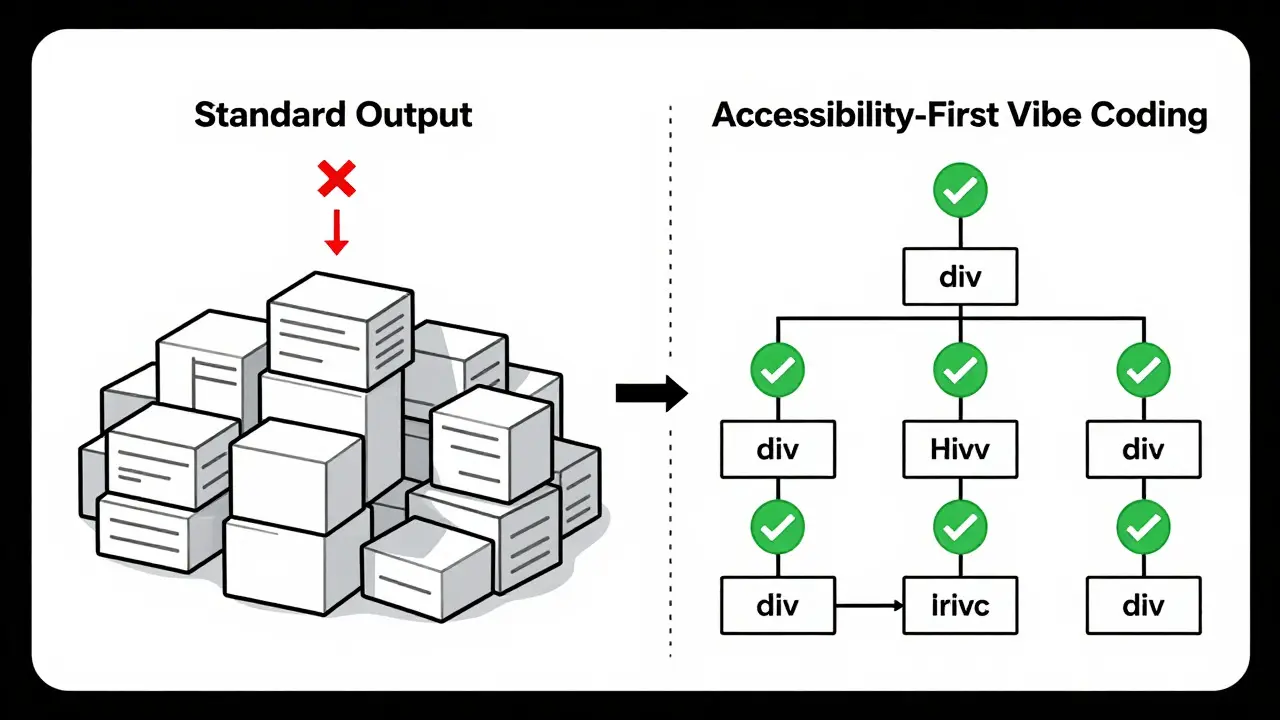
If you just type "build me a login form" into an AI assistant, you will get a pretty box. It probably won't be accessible. Standard vibe coding approaches achieve only 42-55% WCAG 2.1 AA compliance out-of-the-box. Why? Because AI models are trained on vast amounts of web content, much of which is not fully accessible. They default to visual patterns unless constrained.
Without specific instructions, the AI might skip keyboard navigation or use poor color contrast. It might generate divs where buttons should be. This creates technical debt before you even write custom code. To fix this, you need to treat accessibility as a hard requirement in your prompt engineering workflow. You must define success criteria upfront.
Core Tactics for Accessible Prompts
To get high-quality accessible outputs, your prompts need structure. Microsoft’s 2025 study showed that prototypes achieved 78-85% WCAG 2.1 AA compliance when following structured prompt templates. Here are the key tactics to implement immediately.
- Specify Contrast Ratios: Don't say "make it readable." Say "ensure text has a minimum contrast ratio of 4.5:1 against the background." This gives the AI a measurable target.
- Demand Semantic HTML: Explicitly request semantic tags. Ask for "semantic HTML structure with proper heading hierarchy (h1-h6) and landmark regions." This helps screen readers navigate the page.
- Define Keyboard Navigation: State clearly: "Ensure full keyboard navigability with visible focus states and logical tab order." AI often forgets focus management in complex interactive components.
- Request ARIA Labels: For non-standard controls, ask for "ARIA labels for all interactive elements." Replit’s Plan Designer demonstrated 87% accuracy in generating proper ARIA labels when given these detailed requirements.
- Set Screen Reader Expectations: Include phrases like "optimize for screen reader compatibility" and "provide descriptive alt text for images."
Aatir Ahmed, who documented this approach in his 'Vibe Coding 101' series, suggests a template like: "I need a government form app with these core accessibility features: semantic HTML structure, color contrast ratio minimum 4.5:1, keyboard navigation flow mapping, and ARIA labels for all interactive elements." This level of specificity changes everything.
Tools That Support Accessibility-First Workflows
Not all AI coding environments handle accessibility parameters equally well. As of Q3 2025, several platforms have integrated features specifically for this purpose.
| Tool | Version/Update | Key Accessibility Feature | Compliance Accuracy |
|---|---|---|---|
| Replit | v2.3.1+ | Plan Designer with explicit ARIA generation | 87% accuracy on ARIA labels |
| Firebase Studio | April 2025 Update | Automatic accessibility blueprinting | Increased early-stage compliance from 31% to 82% |
| Lovable | v1.8+ | Explicit accessibility parameters in initial prompt | High compliance with structured prompts |
| GitHub Copilot | January 2026 Integration | Integrated axe-core automated testing | Real-time validation during coding |
Firebase Studio stands out for its 'accessibility-first' blueprints. Google’s team implemented automatic accessibility blueprinting that significantly boosted compliance rates. Meanwhile, GitHub Copilot’s integration of axe-core allows for real-time validation. This means you catch issues as you build, not after.
Comparing Vibe Coding to Traditional Methods
How does this stack up against traditional prototyping? Figma’s 2025 research report provides clear data. Building a government application requiring Section 508 compliance took 14.2 days with traditional methods. Using accessibility-first vibe coding, that time dropped to 1.8 days.
When compared to standard no-code tools like Webflow or Bubble, vibe coding with accessibility parameters generated 37% more compliant UI components. Deque Systems’ automated testing confirmed this in their January 2025 report. However, there are limits. Complex scenarios requiring custom ARIA implementations still need manual coding. W3C’s 2025 benchmark study found that 22% of advanced use cases require human intervention.
This makes vibe coding ideal for MVPs, internal enterprise tools, and government applications. It is less suitable for highly specialized assistive technology integrations that demand deep technical customization.
Pitfalls to Avoid: The Compliance Theater Trap
Just because code passes an automated check doesn't mean it's usable. Léonie Watson, a prominent accessibility expert, warned about this in her 2025 Accessibility Weekly podcast. She noted that AI-generated features often miss the contextual understanding of real user needs. This leads to interfaces that are technically compliant but practically unusable for many disabled users.
For example, an AI might add an ARIA label that is technically correct but confusing in context. Or it might overlook focus management in dynamic content updates. GitHub issue tracking shows 237 open issues across major vibe coding platforms related to accessibility gaps as of January 2026. Forty-seven percent of these concern dynamic content and screen reader announcement timing.
To avoid this, combine AI outputs with real user testing. Teacode’s 2025 research recommends testing with people with disabilities within 72 hours of prototype generation. The US Digital Service’s 'AccessiBuild' framework requires testing with five or more users with disabilities. This resulted in 92% higher long-term accessibility compliance rates compared to automated-only validation.
Implementation Strategy for Teams
Adopting this workflow doesn't require every team member to become an accessibility expert. Microsoft’s Developer Blog details a three-day learning curve for PMs to master accessibility-focused prompting. You need knowledge of WCAG 2.1 success criteria, but not deep coding expertise.
Start by creating a library of prompt templates. Firebase Studio’s accessibility prompt library received 4.7 out of 5 stars from government developers. Document what works for your specific use cases. Use phased planning prompts like "Create a phased plan prioritizing accessibility compliance before visual design." This prevents the AI from defaulting to aesthetics over function.
Integrate automated testing early. With tools like GitHub Copilot integrating axe-core, you can validate accessibility continuously. But remember, automation is a baseline, not the finish line. Always follow up with human review and user testing.
Future Trends and Market Context
The market for accessibility-focused prototyping is growing fast. Gartner projects it will grow from $2.1 billion in 2025 to $4.7 billion by 2027. Vibe coding approaches captured 31% market share in Q1 2026. Regulatory drivers like the EU Accessibility Act enforcement starting June 2025 and updated WCAG 2.2 adoption requirements are pushing adoption.
Google released 'Accessibility Co-Pilot' for Firebase Studio in February 2026. It automatically generates accessibility test plans alongside prototypes. The W3C’s Inclusive Design Working Group is developing standardized prompt templates expected in Q3 2026. These developments suggest a future where accessibility is not just a feature, but a fundamental part of the development process.
Enterprise architects are taking notice. Forrester reports that 82% plan implementation within 18 months. Finance and healthcare sectors are leading the way, with 57% of Fortune 500 companies piloting these tools in 2025. The shift is happening now.
What is vibe coding?
Vibe coding is a prototyping methodology that uses natural language prompts to guide AI coding assistants in rapidly assembling functional UI, logic, and data components. It allows developers and product managers to build working prototypes quickly without writing extensive code manually.
How does accessibility-first vibe coding differ from standard vibe coding?
Standard vibe coding focuses on speed and visual output, often resulting in only 42-55% WCAG compliance. Accessibility-first vibe coding incorporates specific WCAG principles and constraints directly into the prompts from the start, achieving 78-85% compliance out-of-the-box by demanding semantic HTML, proper ARIA labels, and keyboard navigation.
Which tools support accessibility-first vibe coding?
Key tools include Replit (v2.3.1+), Lovable (v1.8+), and Firebase Studio (with its April 2025 update). GitHub Copilot also supports this through its integration of axe-core automated testing. These platforms allow you to specify accessibility parameters in your initial prompts.
Is AI-generated accessibility enough?
No. While AI can generate technically compliant code, it may miss contextual nuances. Experts warn of 'compliance theater' where interfaces pass automated checks but fail real users. It is crucial to combine AI outputs with real user testing involving people with disabilities within 72 hours of prototype generation.
What are the best practices for prompting accessibility?
Be specific. Request exact contrast ratios (e.g., 4.5:1), semantic HTML structures, keyboard navigation flows, and ARIA labels for all interactive elements. Use phased planning prompts that prioritize accessibility compliance before visual design. Create and reuse prompt templates based on WCAG 2.1 success criteria.
kimberly de Bruin
July 27, 2026 AT 18:23the idea that we can outsource ethics to an algorithm is a fascinating delusion of our time. we treat accessibility as a checklist item rather than a fundamental human right embedded in the digital fabric. vibe coding sounds like just another buzzword designed to make us feel productive while we abdicate responsibility. if the ai generates semantic html it is only because someone somewhere cared enough to train it on good data. the real work was done by humans long before this prototype existed. we are celebrating the wrapper not the substance. compliance theater is exactly what happens when speed becomes the primary metric of success.
Edward Nigma
July 28, 2026 AT 02:14look i read through this whole thing and its basically just marketing fluff for replit. nobody cares about your 'structured prompt engineering' when the underlying model hallucinates aria labels half the time. you say 87% accuracy but thats probably measured against a broken test suite. traditional prototyping takes weeks because developers actually think about edge cases instead of letting a stochastic parrot guess at keyboard navigation. also who uses firebase studio for anything serious? its a toy. stop pretending this solves the actual problem of inaccessible web design which is mostly caused by lazy designers not missing tools.
Francis Laquerre
July 29, 2026 AT 14:29What a truly revolutionary perspective! It is absolutely thrilling to see how technology is bridging the gap between rapid development and inclusive design. I have been working with teams in Europe where accessibility is often treated as an afterthought, much like here, and this approach could genuinely transform those workflows. The emphasis on specific contrast ratios and semantic structures is not just technical advice; it is a cultural shift towards empathy in code. We must embrace these tools with open arms and rigorous testing protocols. The future of the web depends on such bold innovations!
michael rome
July 30, 2026 AT 20:46It is encouraging to see such detailed guidance on integrating accessibility into the early stages of development. Many teams struggle with the balance between speed and quality, so having concrete tactics like specifying contrast ratios and demanding semantic HTML is invaluable. I would suggest that project managers take the initiative to create standardized prompt libraries within their organizations. This ensures consistency across different projects and reduces the cognitive load on individual developers. Let us continue to support each other in making the digital world more inclusive for everyone.
Andrea Alonzo
July 31, 2026 AT 10:07I have been following the evolution of low-code platforms for several years now, and it is heartening to observe how the conversation around accessibility has matured from a niche concern to a central pillar of modern development practices. When we consider the diverse range of users who rely on screen readers or keyboard navigation, it becomes clear that relying solely on visual aesthetics is insufficient. The statistic regarding the reduction in remediation time is particularly compelling, as it suggests that investing in upfront accessibility planning yields significant long-term benefits. However, we must remain vigilant against the complacency that can arise from automated solutions. It is crucial that we continue to prioritize user testing with individuals who have disabilities, ensuring that the tools we build are not only technically compliant but also genuinely usable and welcoming. By fostering a culture of continuous learning and collaboration, we can create digital environments that empower all users.
Saranya M.L.
August 1, 2026 AT 11:09While the western tech industry is busy reinventing the wheel with 'vibe coding', Indian enterprises have been implementing WCAG 2.1 AA standards natively in their core banking and healthcare systems since 2022. The concept of using AI for accessibility is not novel; it is merely a repackaging of established best practices that have been standard operating procedure in high-volume transactional interfaces in India for years. The reliance on external AI prompts indicates a lack of foundational training in semantic HTML among US developers. True accessibility is not achieved through prompt engineering but through rigorous adherence to ISO 9241-210 and consistent application of ARIA specifications without artificial intelligence intermediaries. The market share growth mentioned is likely due to regulatory pressure rather than technological superiority.
om gman
August 2, 2026 AT 09:56oh wow another article telling me how to do my job better using magic words. i bet the author has never actually shipped a product that passed a section 508 audit without hiring a consultant to fix the mess afterwards. dynamic content handling is still a nightmare even with axe-core integration. you think asking nicely to an llm fixes focus trapping in complex modals? please. save your money and hire a real frontend engineer who knows how to write accessible javascript instead of prompting a chatbot to guess at tab indices. this whole vibe coding trend is just procrastination dressed up as innovation